


Delivery and pick up control that’s customizable and easy to use.
eLocal is a highly customizable and easy to use delivery and pick up solution that helps you make more money, at a great price.
PLUS
$39/month
0-75 Orders per Month
PRO
$89/month
76-200 Orders per Month
PREMIUM
$149/month
201-1000 Orders per Month
ENTERPRISE
$249/month
1001 - 3000 per Month
ULTRA
$349/month
3000+ Orders per Month
All Plans (Plus, Pro, Premium, Enterprise & Ultra) Include the Features Below:
- Full control over local delivery and pick-up options
- Shipping control for orders outside your store area
- Custom checkout options
- Preparation Time feature
- Countdown timer to encourage purchase
- Minimum amount purchase
- Customizable widget at product level or checkout page
- Charge customers extra for delivery on specific days
- Inventory Management Control
- Pick-up in-store order limit setting
- Rush Delivery option
- Zip Code Delivery limits
- Multiple Deliveries & Pickup Dates by Zones (on/off)
- Multiple Locations Management
- Seasonal Windows/Holidays with customizable dates
- Shared Modifiers in Bulk for Product Option Customizations
- Automatically add product/extra charges to cart
- FREE training and set-up support

FREE eLocal Set-up, Training, and Support
Epic strives to offer the best service to our customers
Get More with eLocal by Signing Up for epicComplete
eLocal is the most powerful local delivery and pick up app on BigCommerce.
eLocal Highlights
Flexible Fulfillment Options
Full control over local delivery and pick-up options
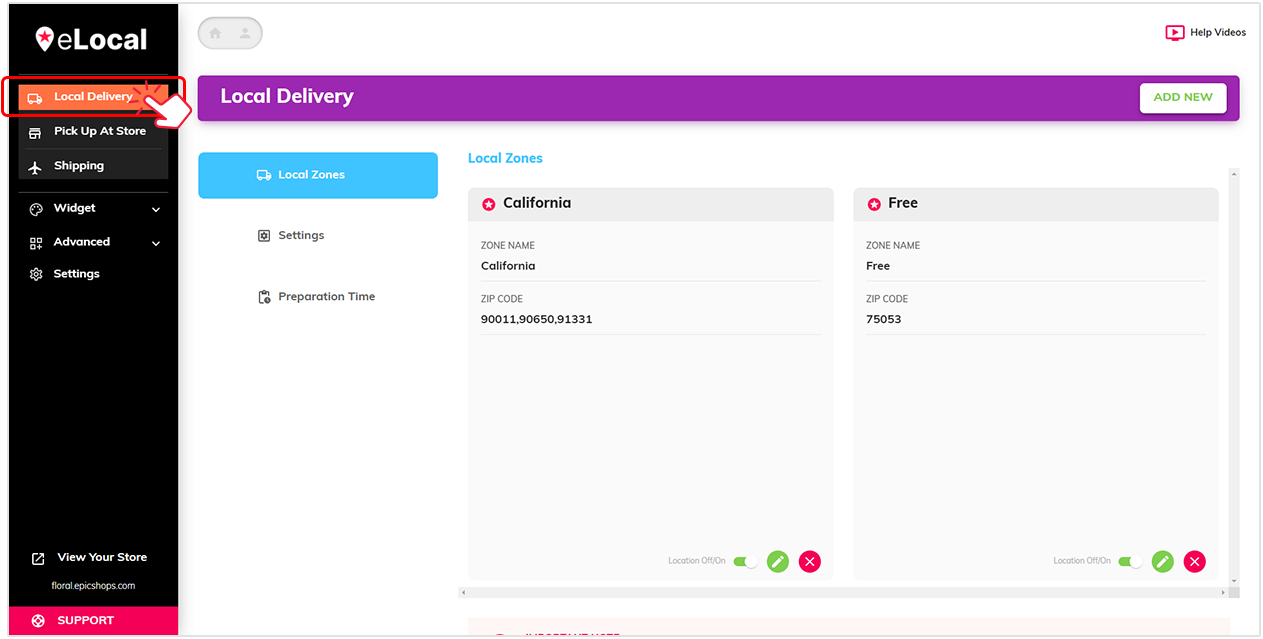
In Local Delivery, you can manage your local zones, set delivery dates, control inventory and many more…
In Pick Up At Store, you can add locations, set delivery dates, manage checkout, control inventory and many more…

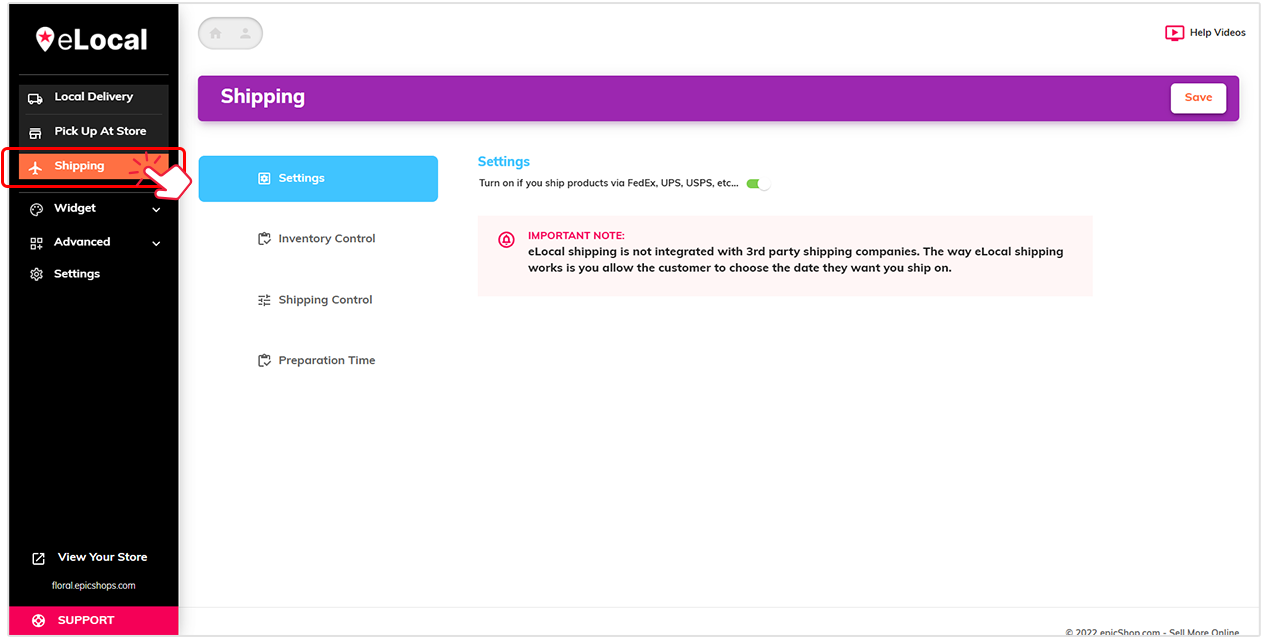
Shipping control for orders outside your store area
eLocal shipping gives you the ability to set dates for shipping, manage inventory and add preparation time.
Custom checkout options

Enable feature by clicking on the toggle button

We provide a custom checkout experience that adds a Pick Up At Store option, set default country,
and control over the billing same as shipping.

Activate it on your website by following these 2 steps. Simply click the tab to show instructions.

Customizable widget at the product level or checkout page
eLocal gives you the ability to customize widget to match your brand.

Widget design lets you choose your colors, texts and even use custom CSS
If you don’t know where to start, we have preset design styles for you to choose from and edit
Shows a live preview to see real time changes.

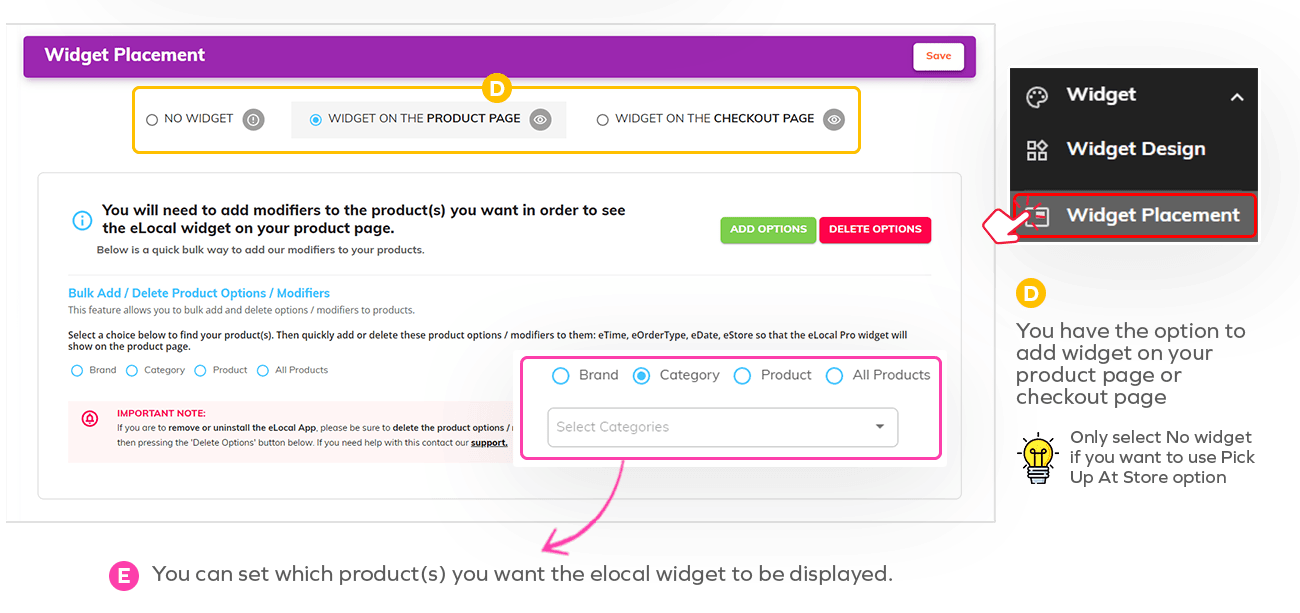
You have the option to add widget on your product page or checkout page

You have the option to add widget on your product page or checkout page
Zip Code Delivery limits
Local Delivery allows you to control your delivery by days, weeks, holidays, or custom days based on postal codes.
Local Delivery gives you the option to:
- Add new custom zones
- Edit individual setup
- Remove outdated zones
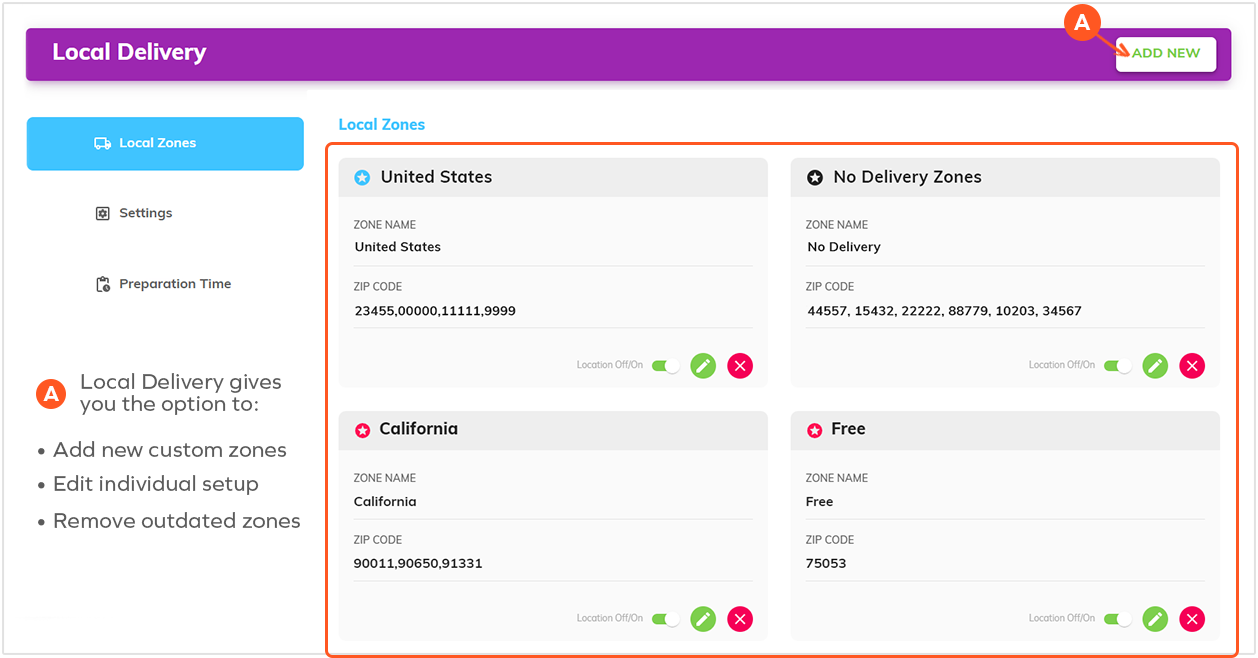
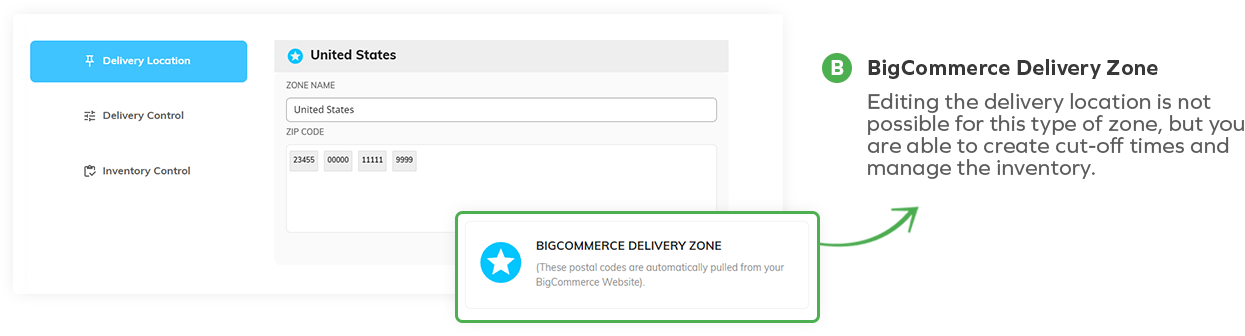
Editing the delivery location is not possible for this type zone, but you are able to create cut-off timees and manage inventory.
eLocal allows you full control on adding or editing the location name and zip codes for custom zones.
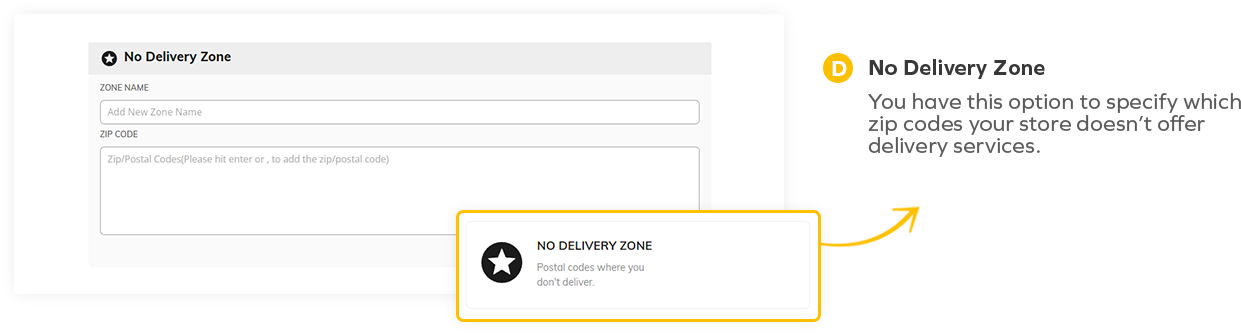
No Delivery Zone
You have this option to specify which zip codes your store doesn't offer delivery services.
Advanced Order Controls
Preparation Time feature
This feature allows you to set a timeframe before your products are delivered, shipped or picked up.
Select what suits best for your store from the dropdown options
If you want preparation time to count actual days you do not offer your services, then click the check box

Countdown timer to encourage purchase
On your local delivery settings, enable feature by clicking on the toggle button
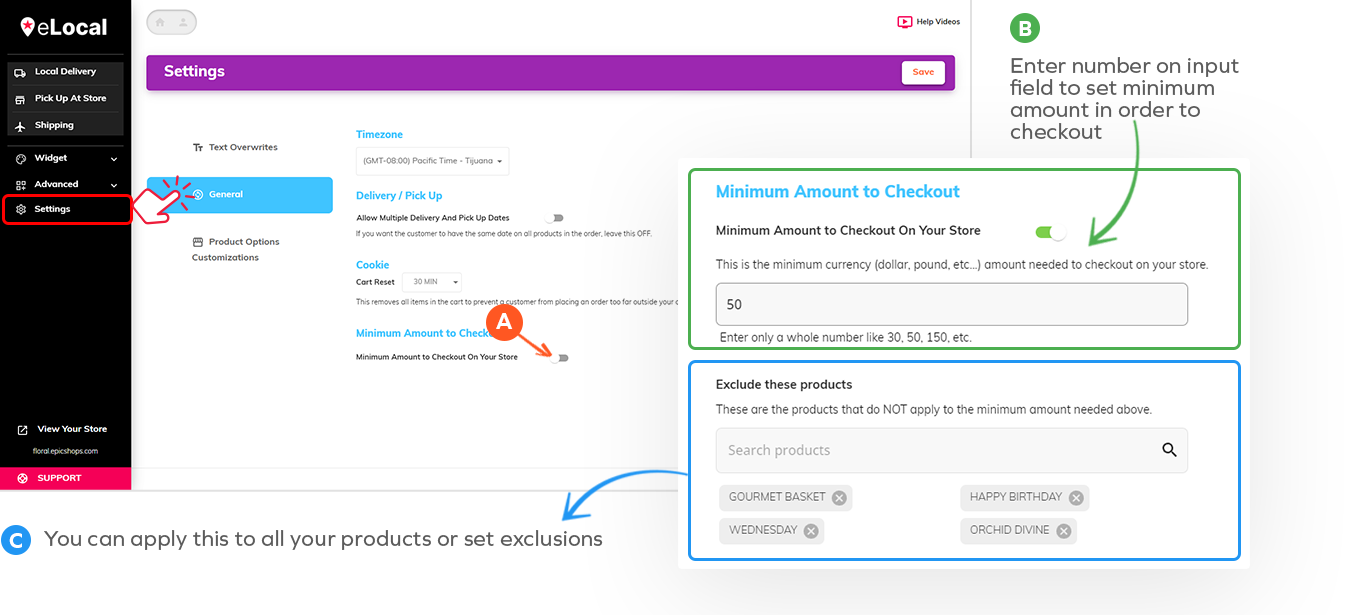
Minimum amount purchase
Select what suits best for your store from the dropdown options
On your eLocal General settings, enable feature by clicking on the toggle button
You can apply this to all your products or set exclusions
Pick up in-store order limit setting
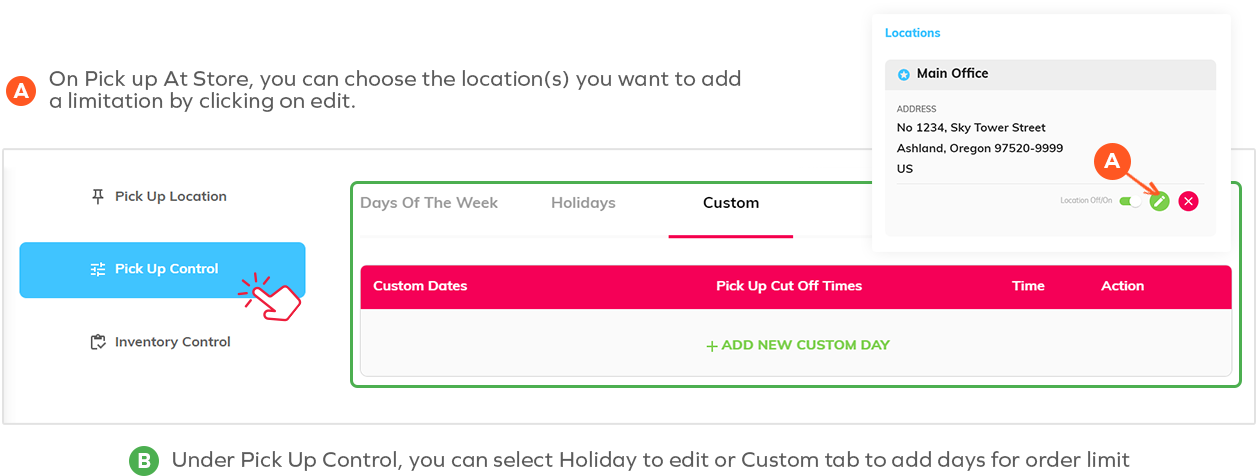
On Pick up At Store, you can choose the location(s) you want to add a limitation by clicking on edit
Under Pick Up Control, you can select Holiday to edit or Custom tab to add days for order limit
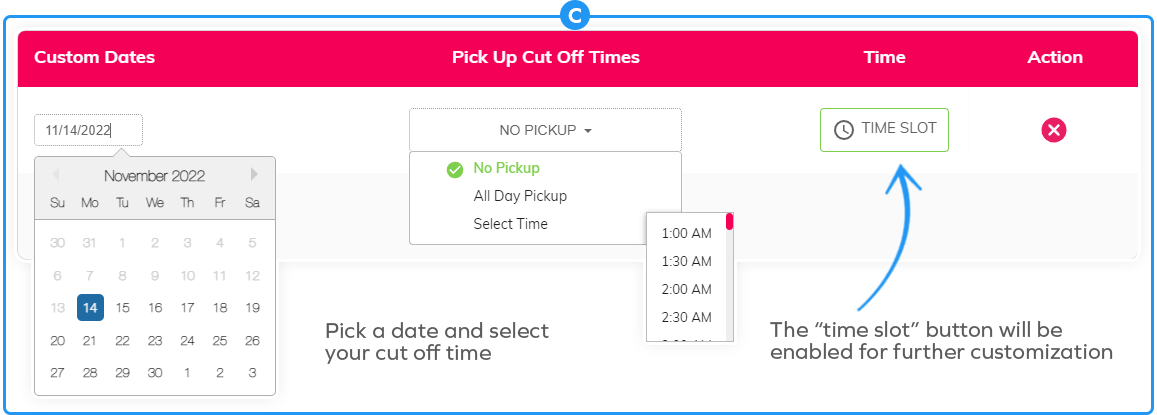
Pick a date and select your cut off time
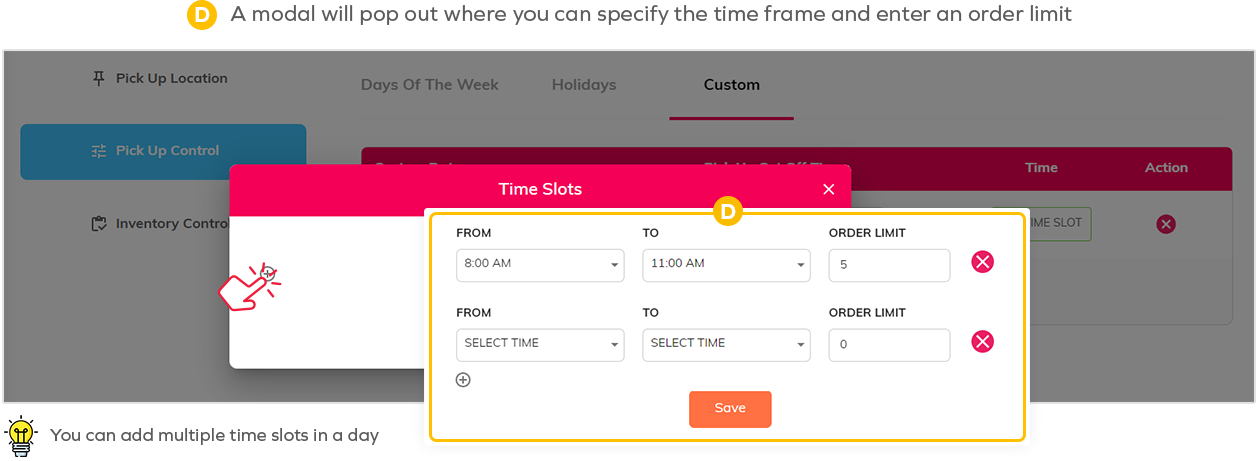
A modal will pop out where you can specify the time frame and enter and order limit
Seasonal Windows/Holidays and Customizable dates of your choice
Set the holidays or custom days you will or not allow delivery, pick up, or shipping.
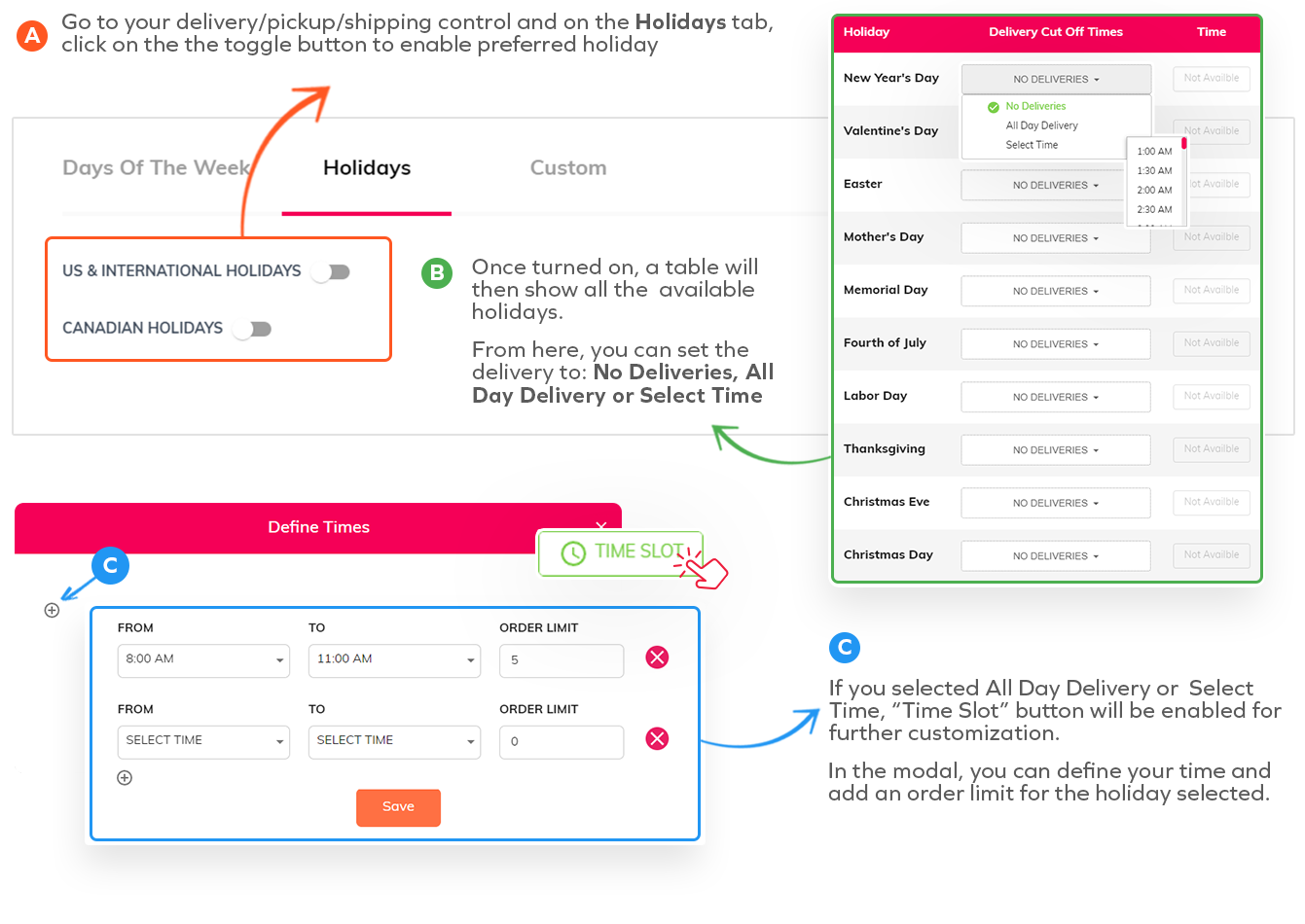
Go to you delivery/pickup/shipping control and on the Holidays tab click on the toggle button to enable preferred holiday
Once turned on, a table will then show all the available holidays.
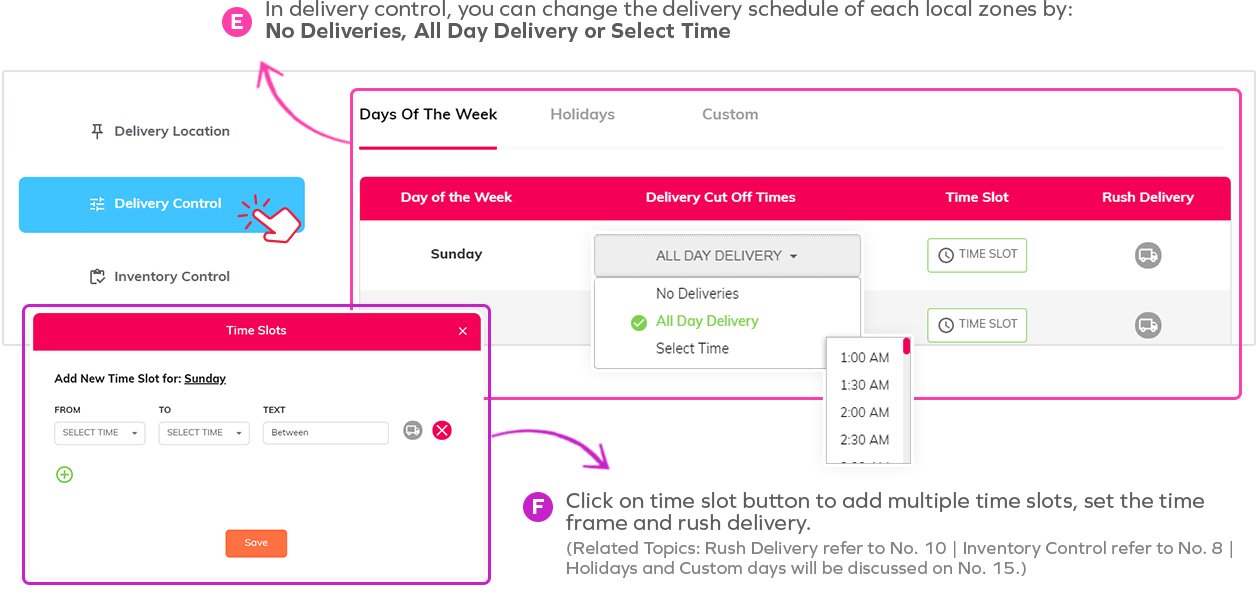
From here, you can set the delivery to: No Deliveries, All Day Delivery or Select Time
If you selected All Day Delivery or Select Time, "Time Slot" button will be enable for further customization.
In the modal, you can define your time and add an order limit for the holiday selected.
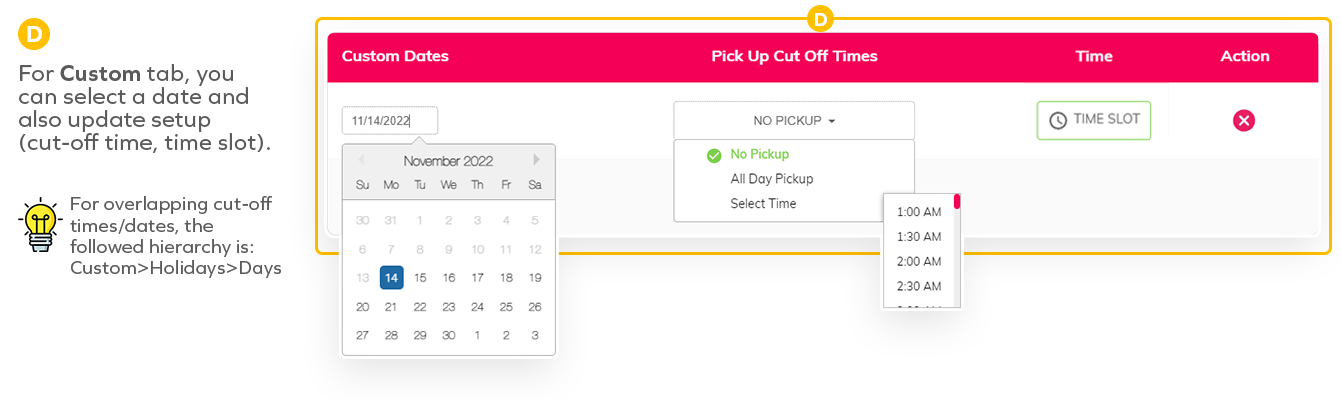
For Custom tab, you can select a date and also update setup (cut-off time, time slot)
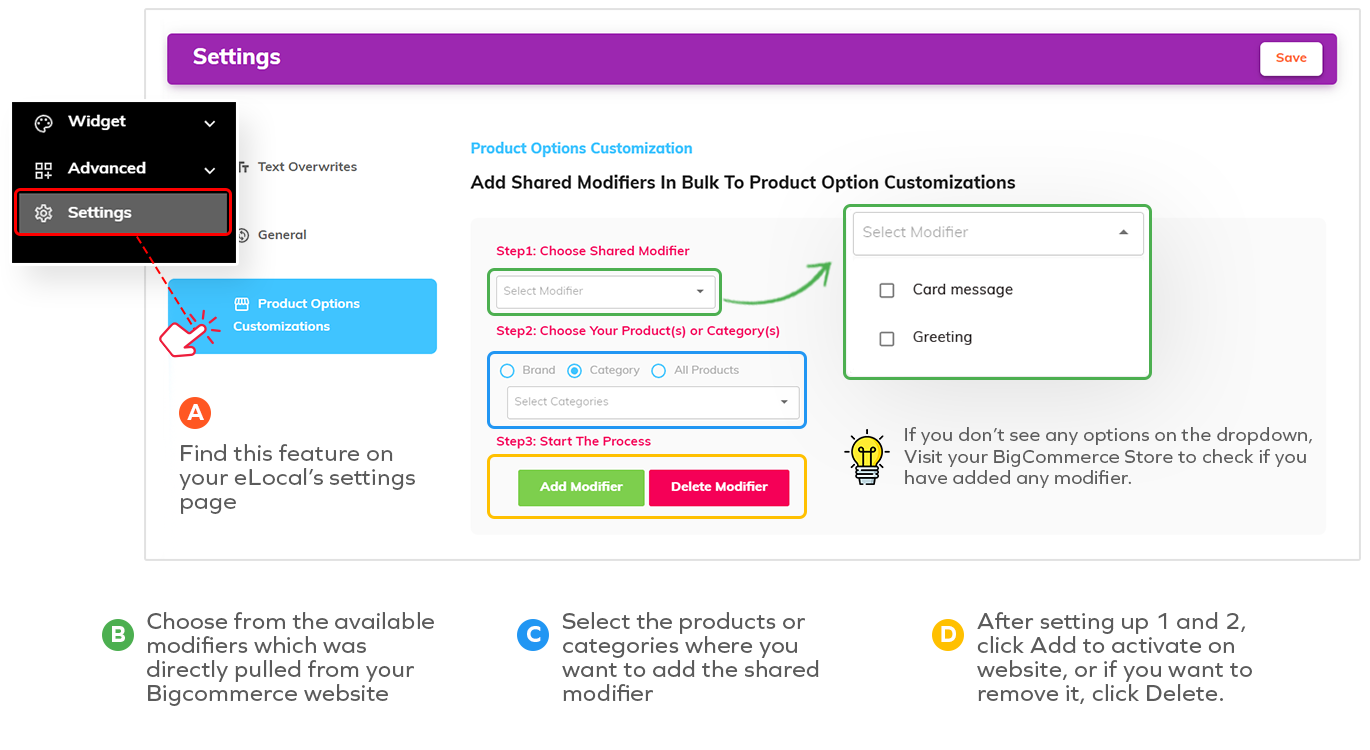
Shared Modifiers In Bulk To Product Option Customizations
Adding the same modifiers on various products usually takes time. This feature will make it easier for you.
Find this feature on your eLocal's settings page
Choose from the available modifiers which was directly pulled from your Bigcommerce website.
Select the products or categories where you want to add the shared modified
After setting up 1 and 2 click Add to activate on website, or if you want to remove it, click Delete
Set a cookie that empties the cart after x mins
This is convenient for when someone leaves an item in the cart and tries to come back and order it past the daily cut off time.
Go over you eLocal setting and click on General
On the dropdown, you have the option to select from None to different time durations.
Smart Revenue Tool
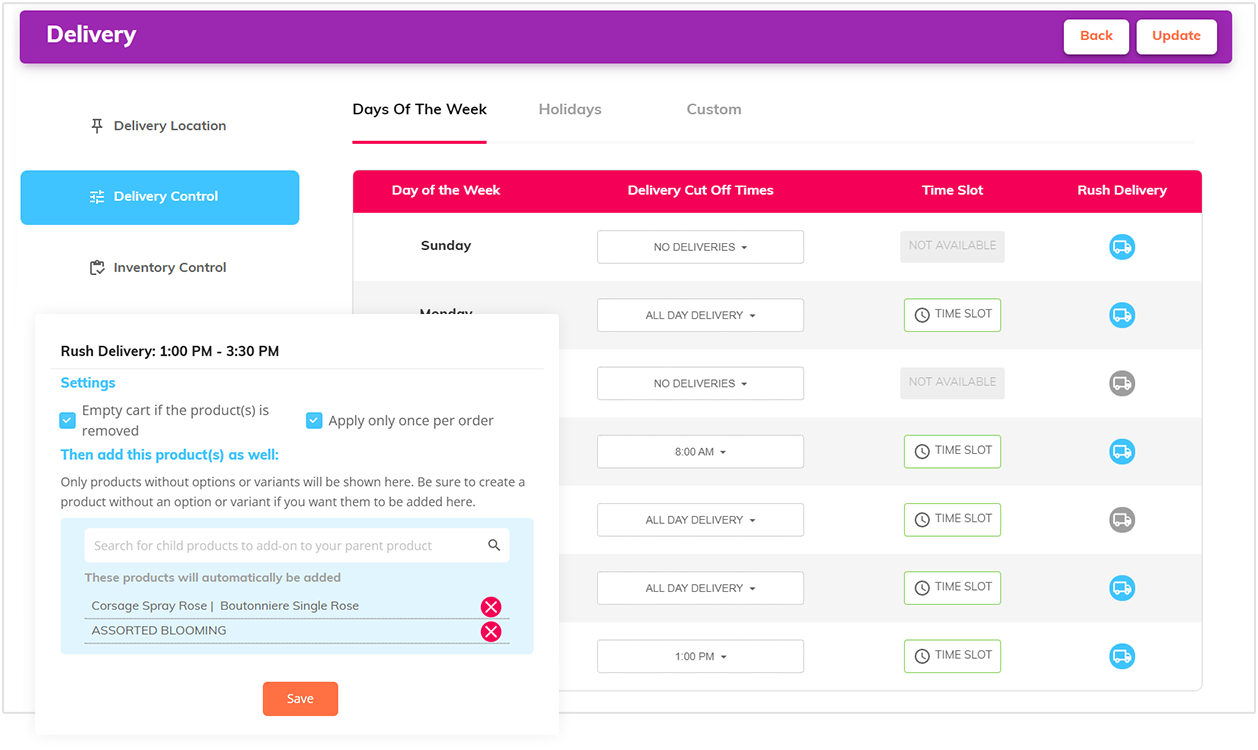
Rush Delivery option
This features gives you the option to serve your customers better
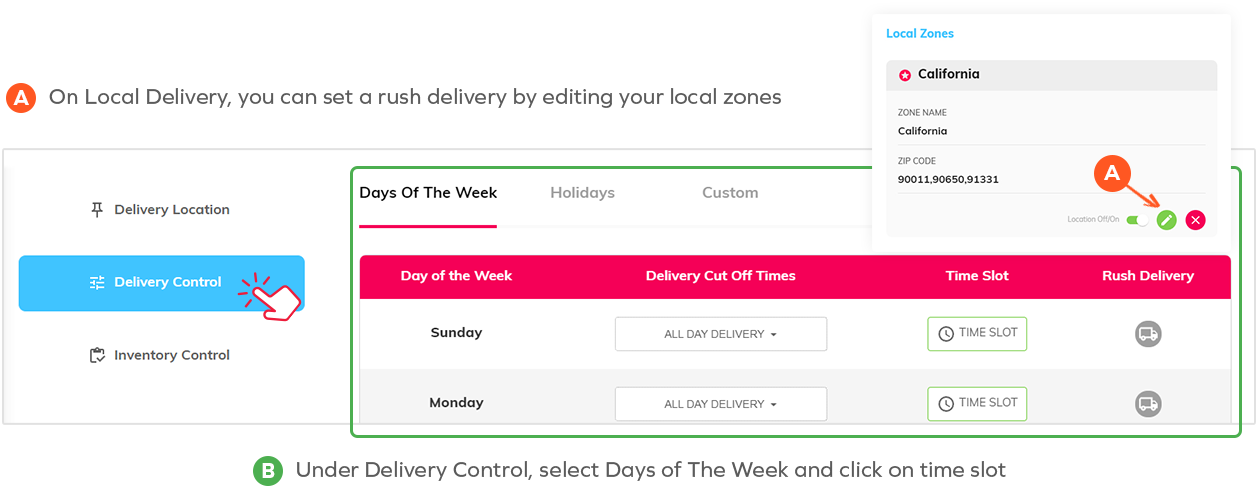
On Local Delivery, you can set a rush delivery by editing your local zones
Under Delivery Control, select Days of The Week and click on time slot
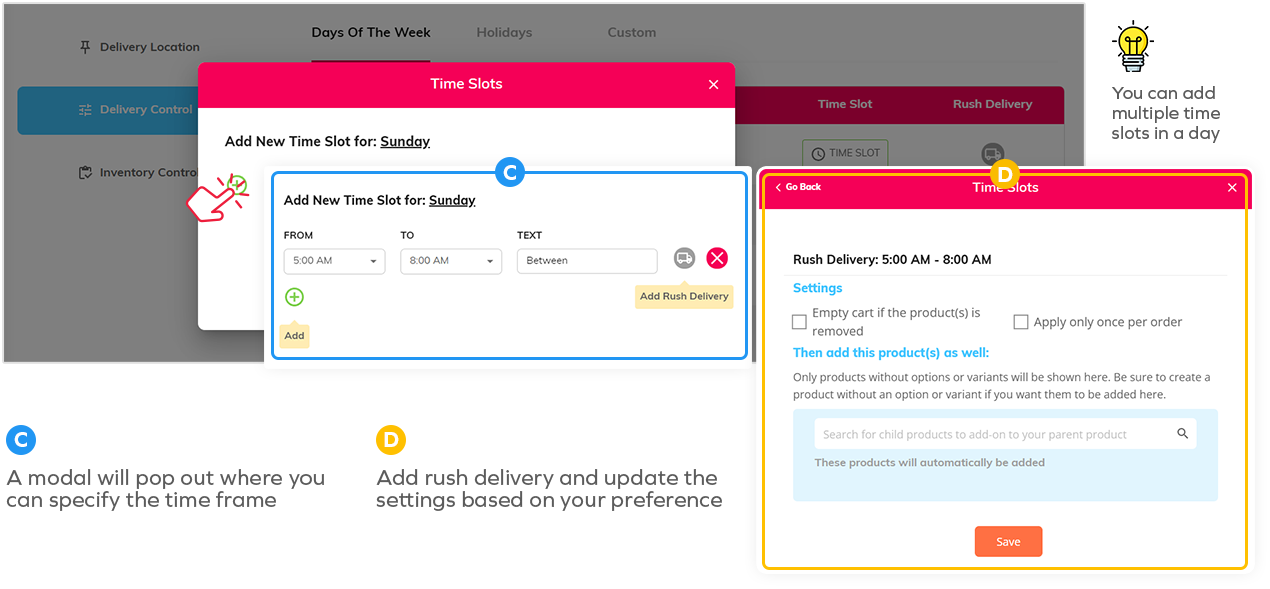
A modal will pop out where you can specify the time frame
Add rush delivery and update the settings based on your preference
Charge customers extra for delivery on specific days
Once you set a local zone with the rush delivery feature, it will apply extra charges to the customer
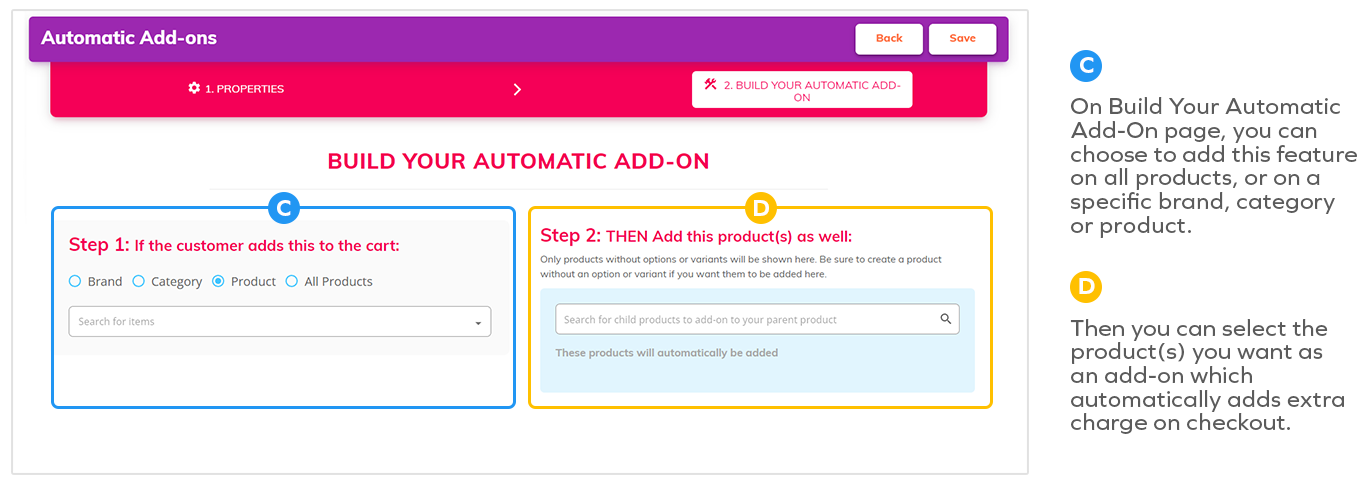
Automatically add a product / extra charges to the shopping cart
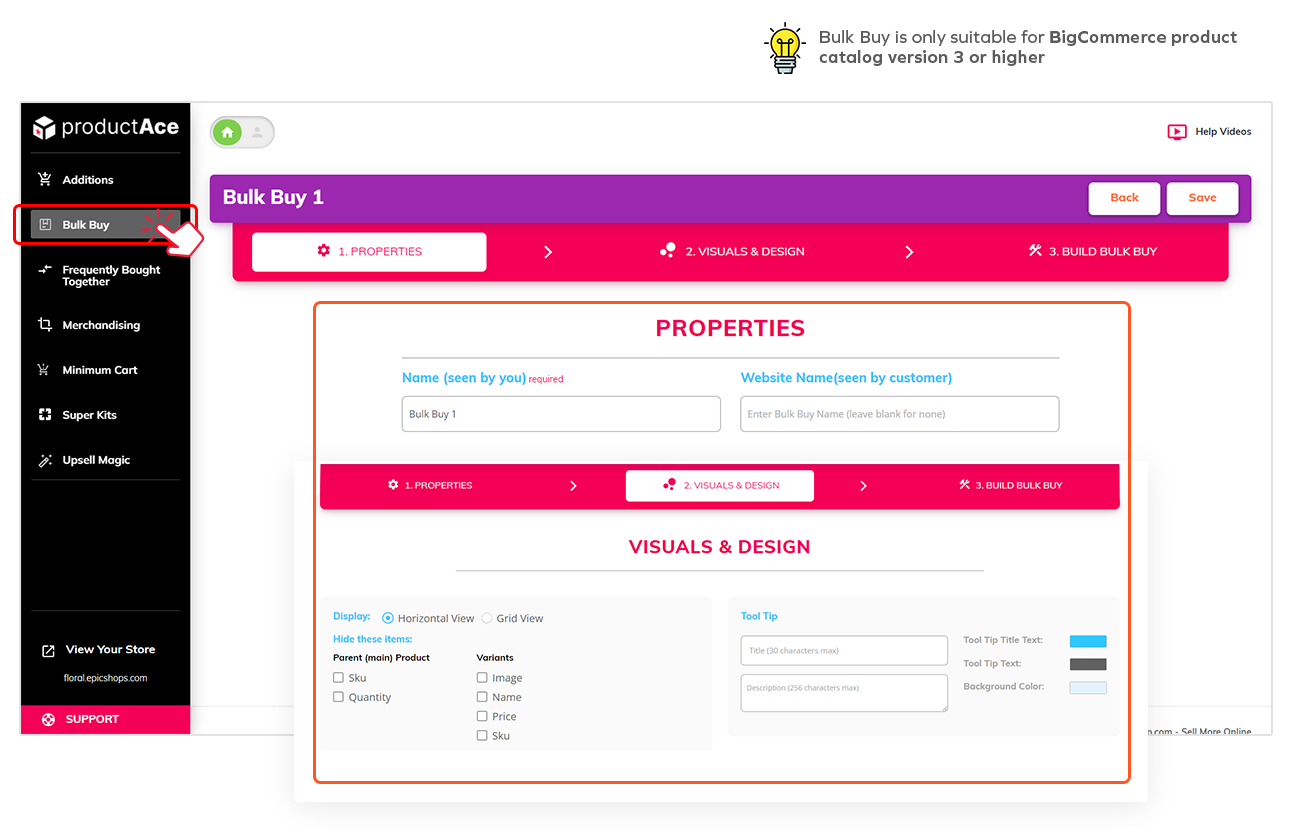
Create product kits that automatically add to the shopping cart.
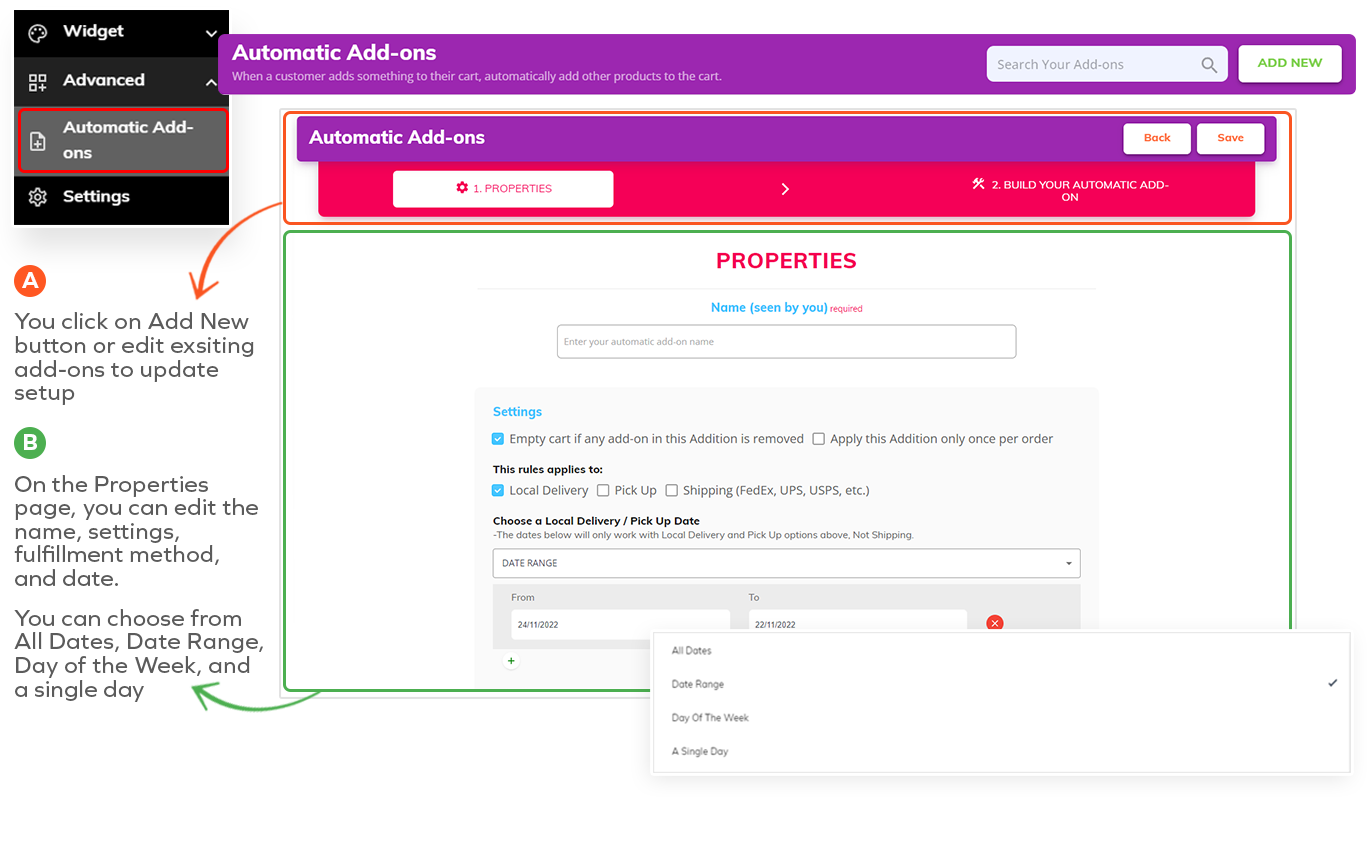
You click on Add New button or edit exisiting add-ons to update setup
On the Properties page, you can edit the name, settings, fulfillment method, and date.
If you selected All Day Delivery or Select Time, "Time Slot" button will be enable for further customization.
In the modal, you can define your time and add an order limit for the holiday selected.
For Custom tab, you can select a date and also update setup (cut-off time, time slot)
Optimized Product Availability
Inventory Management Control
Easily set your inverntory to either be delivered locally, picked up, shipped, or combination of any of the three.
For both Local Delivery and Pick Up At Store, you have the ability to manage inventory on each of your local zones and pick up locations
Simply click on edit and select Inventory control
Easily filter by brand, category, product or all products
Easy bulk editing by entering SKUs
Enable/Disable products individually
Or update everything all at once by clicking on the icon with 3 dots
Some of the Happy eLocal Clients
Albuquerque Flower Market
AZ Flower Market
Armadillo Designs
Biogenic Foods
ChadsToolbox.com
Kitch'n
Lappe's Bee Supply and Honey Farm LLC
Masterpiece
MOTO-D Racing
PowerBoatSupply by NuWave Marine
Relentless Pursuit Nutrition
Sugar Shack Cookie Co
The Grand Bouquet Florist, Inc.
Whata Basket-Gift Baskets
Whitman Publishing
Wickhams

FREE eLocal Set-up, Training, and Support
